Background Remover Clean Cutouts From Any Photo
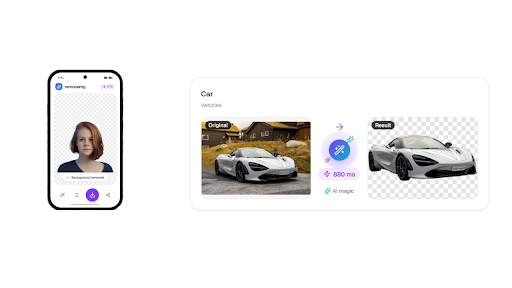
A background remover is an online tool that separates the subject of a photo from everything behind it. removerbg uses AI to do this work automatically. You upload an image, and the tool erases the backdrop in seconds. The result is a clean cutout ready to drop into any new design.
This matters because manual cutting takes time and real skill. Old methods meant tracing edges by hand in heavy software. removerbg replaces that effort with one upload and a fast, automatic result. Anyone can produce professional cutouts without design experience or a big budget.
What Is a Background Remover
A background remover deletes the backdrop behind a person, product, or object. It keeps the subject and turns the rest transparent. Working at the scale of single pixels, removerbg sorts every one into either the subject or the surrounding scene. The tool then produces a transparent PNG that sits cleanly on any new scene.
Because the process runs on a deep-learning model, you do not paint or trace anything. You point the tool at a JPG, PNG, or WebP file, and it returns a cutout. That shift turns a slow chore into a quick, repeatable task for anyone.
What Can removerbg Do for You?
removerbg does far more than erase a backdrop. A full editing workspace is built right into the tool. Inside it you can swap in a fresh backdrop, shift the subject around, scale it up or down, and drop in a gentle shadow. Once the composition satisfies you, saving it out in whatever format your project calls for takes a single click.
Beyond single edits, this background remover also offers an HTTP API on paid plans for bulk and automated work. Developers process large image libraries without manual clicks. An Android app runs the same AI, and it shares one pool of credits and history with your web account.
Why Does Clean Edge Detection Matter?
Edges decide whether a cutout looks real or fake. Hair, fur, and fine detail are the hardest regions to separate. removerbg keeps clean edges around these areas by judging every pixel independently. Thin strands and soft outlines survive the cut instead of turning into a hard, blocky border.
Clean edges protect the whole image once you place it on a new background. A rough outline gives away the edit at a glance. The following details are the ones removerbg handles carefully.
Flyaway hair strands and loose curls
Animal fur and soft pet outlines
Fine jewelry, thin straps, and cords
Semi-transparent edges like glass or lace
Which Files Can You Upload and Download?
removerbg accepts common web image formats and returns flexible outputs. Feed it a JPG, PNG, or WebP image weighing no more than 10 MB. You download a transparent PNG, or export the result to JPG or WebP. Here is a quick reference for what the tool takes in and hands back.
Stage
Supported formats
Limit
Upload
PNG, JPG, WebP
Up to 10 MB per image
Download
Transparent PNG
Keeps transparency
Export
JPG or WebP
Flat background or new scene
Who Uses a Background Remover?
A background remover fits almost any workflow that involves images. Sellers, designers, developers, and everyday users all reach for clean cutouts. The list below shows how different people put removerbg to work.
Online sellers cutting products for marketplaces like Amazon and eBay
Car dealers and classifieds staging vehicles on neutral backdrops
People polishing portraits for LinkedIn, resumes, or ID photos
Designers dropping a transparent PNG into Canva, Figma, or PowerPoint
Creators making stickers, thumbnails, and printed cards
How Fast and Private Are Your Uploads?
Speed is a core reason people choose an AI tool over manual editing. removerbg returns results in seconds, with site examples showing times near 880 ms and 0.7s. That pace lets you clear a batch of photos in one short sitting.
Privacy sits alongside speed. removerbg processes each image only for that request. The pictures you send never feed into any model training. Whatever you make stays yours, and the moment you download a cutout you are cleared to use it commercially.
What Do You Get for Free?
Giving removerbg a spin takes no signup whatsoever. The free tier lets you test real cutouts before committing to anything. Moving to a paid plan raises your daily limits and opens API access, but the entry point stays free.
Three cutouts a day without registering or logging in
Twenty cutouts a day once you sign up for a free account
Transparent PNG exports available on every plan
Identical AI quality whether you pay or not
Frequently Asked Questions
What is a transparent PNG good for?
A transparent PNG stores your subject with no background behind it. That lets you place the cutout over any color, photo, or layout without a visible box. Designers layer it into Canva, Figma, or PowerPoint, while sellers set products on clean white or branded scenes. removerbg exports this format by default.
Can I use removerbg cutouts commercially?
Yes. removerbg allows commercial use, and you keep ownership of your content. That means you can place cutouts in store listings, ads, printed cards, or client work without extra steps. Because your images are processed only for the request and not used to train models, your material stays yours throughout the process.
What image formats can I upload to removerbg?
removerbg accepts PNG, JPG, and WebP files up to 10 MB each. After the AI removes the background, you download a transparent PNG or export the result to JPG or WebP. This range covers photos from phones, cameras, and marketplaces, so most everyday images upload and process without any conversion first.
Does the tool handle tricky details like hair?
Yes. removerbg runs a deep-learning model that inspects the photo one pixel at a time, ruling on whether each belongs to the subject or the backdrop. This approach keeps clean edges around hair, fur, and fine detail. Loose strands and soft outlines survive the cut instead of becoming a hard border, so portraits and pet photos still look natural.